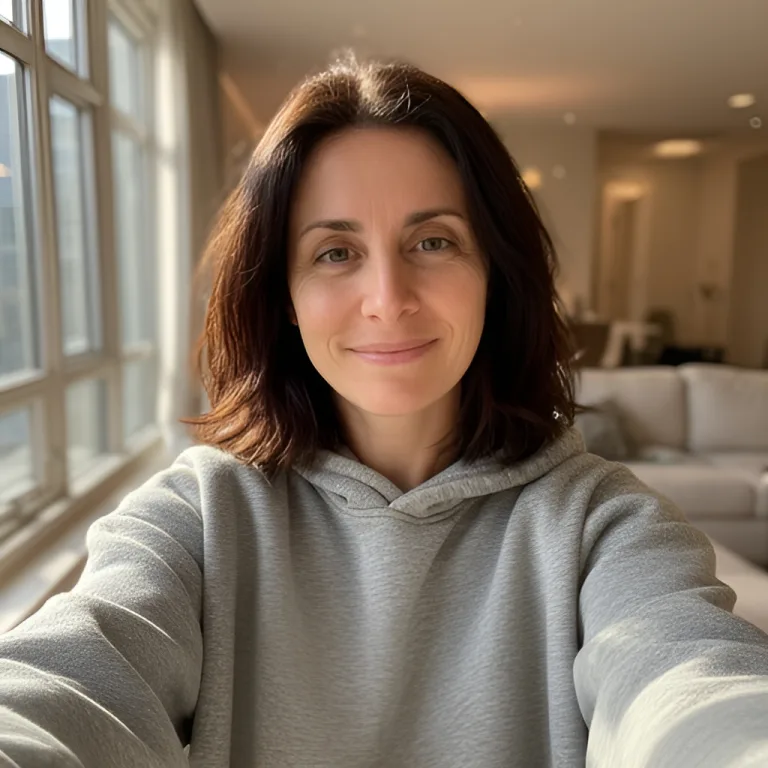
PromptTest selfie A — the reference photo for the two portraits of her below.
Input. AI-generated face, not a real person.
By Jay Padimala, Founder
Upload one selfie, pick the Creative style and describe a 1980s studio portrait. AI Headshot Generator returns a 1024×1024 retro portrait in under a minute.
Feathered hair, laser backdrop, faded film colour — from one selfie and one description
How we tested: On 4 October 2026 we ran four portraits through the same model and prompt builder AI Headshot Generator uses, called directly rather than through the live page: two test selfies, two 1980s briefs each, Style set to Creative. Both selfies are AI-generated faces, not real people, so nobody's photo is published here. All four came back with period hair, wardrobe, backdrop and film colour. Likeness held at the level of face shape and expression; hair colour came back lighter in all four, stubble was dropped in one, and both subjects looked younger. Each portrait took 17 to 18 seconds. The inputs and outputs are shown below, unedited apart from resizing. We did not test the other products in the table; the notes on them describe how they are offered, not how they scored.
| Tool | Pricing | Friction |
|---|---|---|
| MiOffice ★ | AI Studio runs on credits — Starter pack $6.99 one-time, credits never expire | Browser-based, no upload required for everyday tools. |
| ChatGPT | Paid plan for higher image limits | The route most people use for this trend. It needs an account, image generation is rate-limited on the unpaid tier, and results swing with prompt wording, so expect a few attempts. |
| Gemini | Paid plan for higher image limits | Needs a Google account and applies daily image limits. Like ChatGPT, the output depends heavily on how the prompt is worded. |
| EPIK | Paid per batch | A phone app you have to install. Its yearbook packs ask for a set of selfies rather than one, and results are sold in paid batches. |
| Remini | Subscription | A phone app with a subscription for full access. Looks come from a preset library, so you choose from what is offered rather than writing your own brief. |
Front-facing, one person, even light, no sunglasses. JPG, PNG or WebP up to 25 MB. The selfie is the reference the portrait is built from.
Set Style to Creative, then use the Description field to name the hair, wardrobe, backdrop, lighting and film look you want. The more specific the brief, the more 1980s the result.
The portrait comes back square at 1024×1024. For an Instagram Story, place it on a 9:16 background or crop it in the Instagram editor before adding the Add Yours sticker.
Real outputs from each style category. Press play.
AI-generated faces used as the reference photos. Not real people.
PromptTest selfie A — the reference photo for the two portraits of her below.
Input. AI-generated face, not a real person.
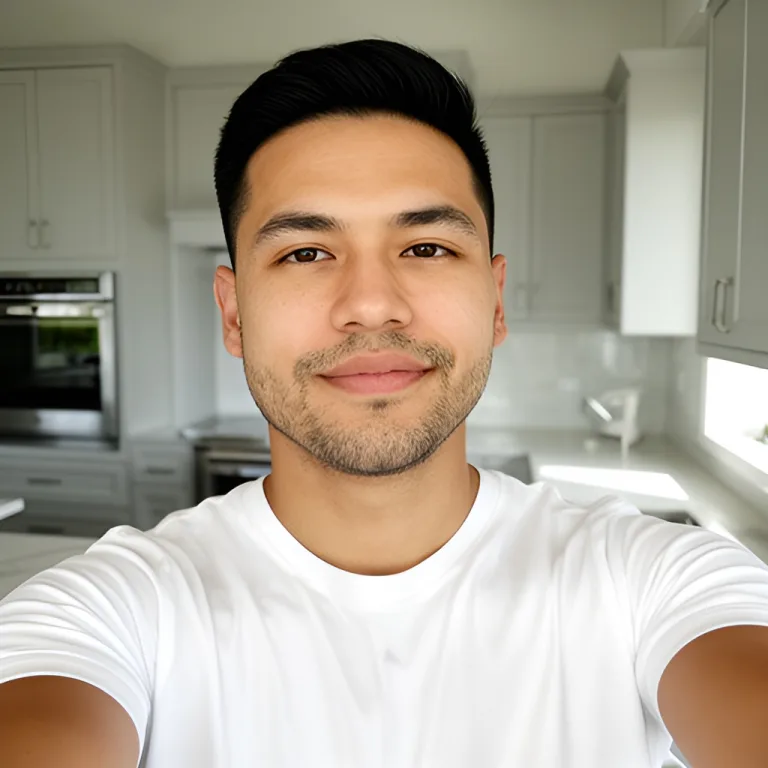
PromptTest selfie B — the reference photo for the two portraits of him below.
Input. AI-generated face, not a real person.
The most recognisably 1980s result of the two briefs.
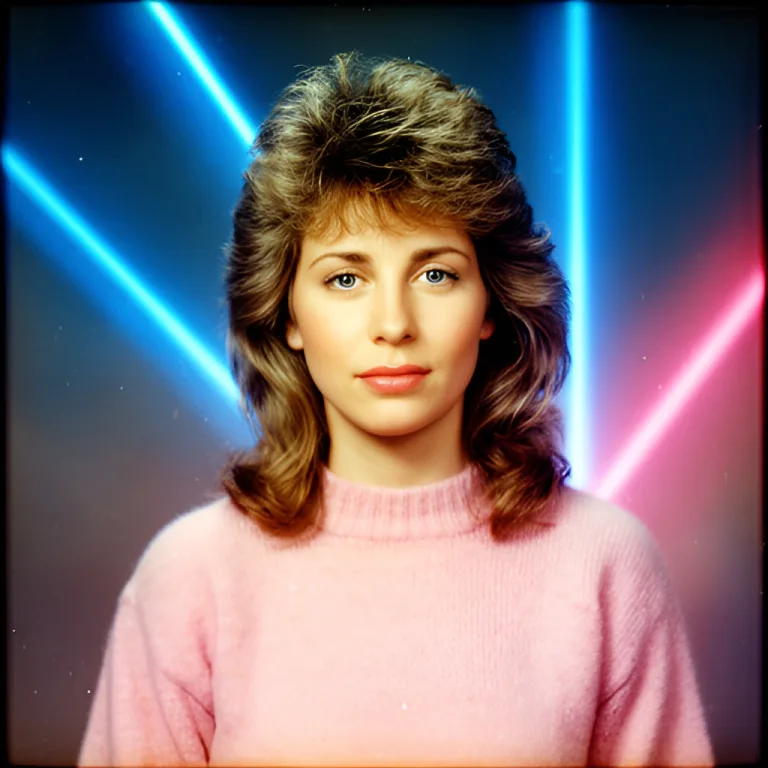
Prompt1980s school yearbook studio portrait, big feathered voluminous 80s hair, pastel sweater, blue-and-pink laser beam backdrop, direct on-camera flash, soft focus, faded Kodak film colour, visible film grain
Hair came back lighter than the selfie.
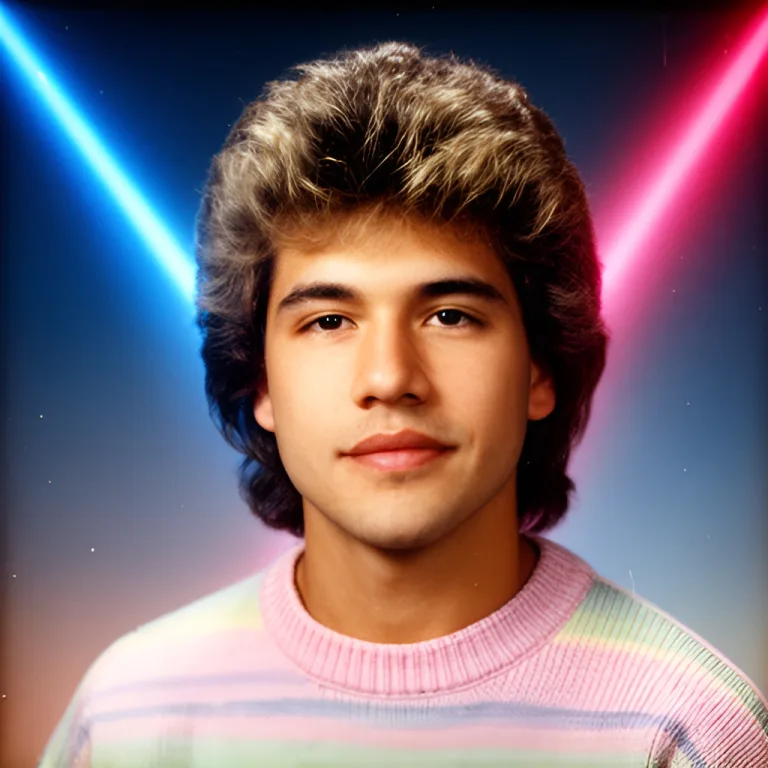
Prompt1980s school yearbook studio portrait, big feathered voluminous 80s hair, pastel sweater, blue-and-pink laser beam backdrop, direct on-camera flash, soft focus, faded Kodak film colour, visible film grain
Stubble was dropped and the subject looks younger.
Mall-studio glamour with a hair light and a soft-focus filter.
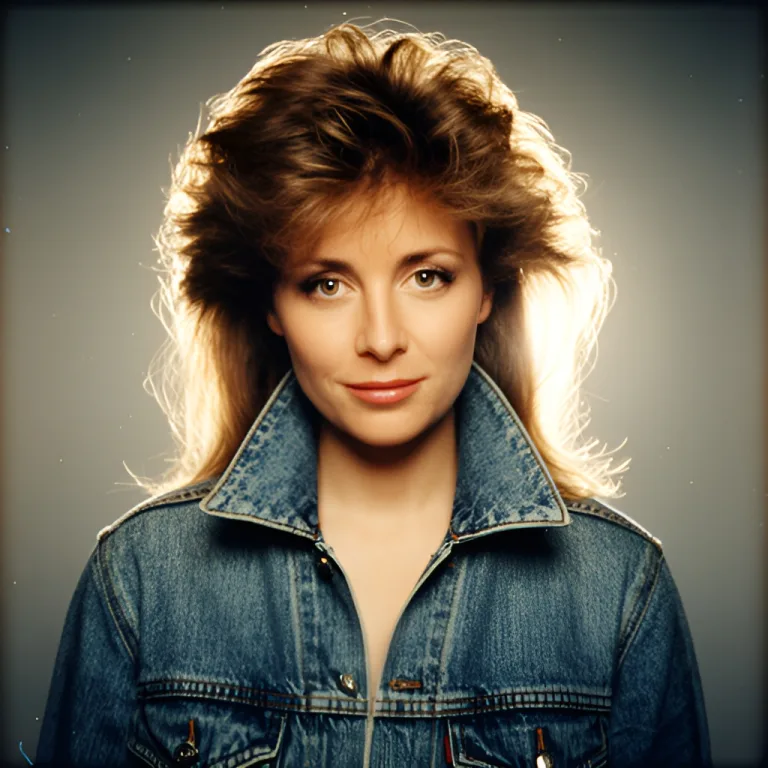
Prompt1980s glamour mall-studio portrait, teased hair, denim jacket with popped collar, mottled blue muslin backdrop, hair light from behind, soft-focus filter, warm faded 35mm film print, slight grain
The backdrop came out grey: the Studio Lighting background setting asks for a neutral grey backdrop, which won over the blue in the description.
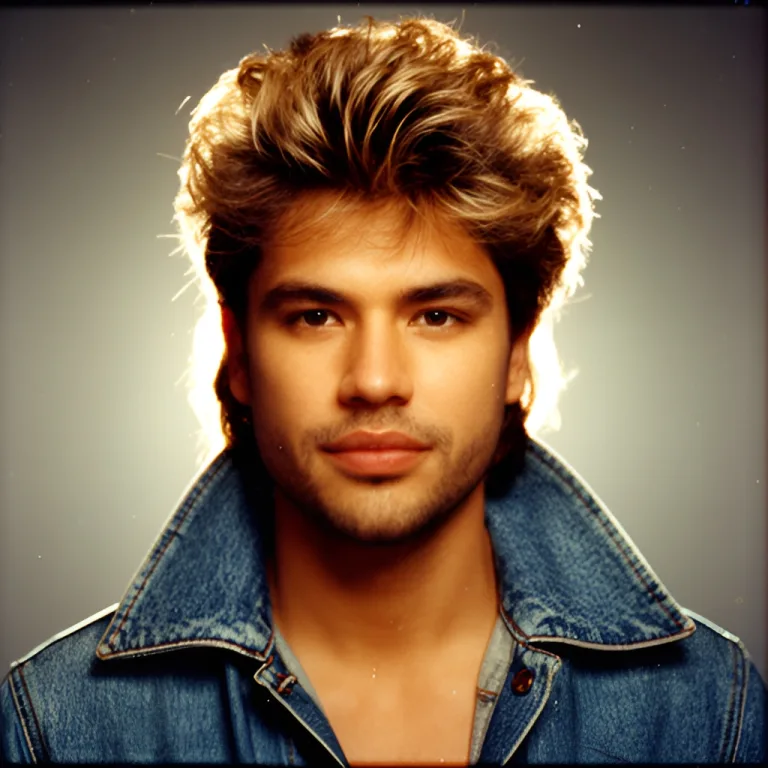
Prompt1980s glamour mall-studio portrait, teased hair, denim jacket with popped collar, mottled blue muslin backdrop, hair light from behind, soft-focus filter, warm faded 35mm film print, slight grain
Hair came back lighter; stubble was kept this time.
The look most people post: school-photo framing, a laser or mottled blue backdrop, on-camera flash and a pastel sweater. In our runs this brief gave the most recognisably 1980s result of the two we tried.
Mall-studio glamour: teased hair, a denim jacket with the collar up, a hair light from behind and a soft-focus filter. Ask for a warm, faded 35mm print so the colour sits where a real print from the decade would.
AI Headshot Generator works from one face per photo. For a couple or family post, run each person separately with the same description so the backdrop and film look match, then lay the portraits side by side.
The square output fits a profile picture without cropping. Keep the brief to head-and-shoulders details, since the circular crop hides most of the wardrobe and backdrop anyway.
Writing only "make it 80s" in the description
Fix: Name five things: hair (feathered, teased, voluminous), wardrobe (pastel sweater, denim jacket), backdrop (laser beams, mottled blue), lighting (on-camera flash, hair light) and film look (faded colour, soft focus, grain).
Leaving Style on Professional
Fix: Professional asks for corporate attire and sharp focus, which fights a retro brief. Switch Style to Creative before generating.
Uploading a group photo, a side profile or a selfie with sunglasses
Fix: Use one person, front-facing, eyes visible, even light. The portrait is built from that single face, so anything hiding it weakens the likeness.
Expecting an exact likeness on the first try
Fix: In our runs hair came back lighter every time and stubble disappeared once. Write what must stay — "keep my dark brown hair colour and light stubble" — and generate again.
Asking for a full-body scene such as a roller rink or an arcade
Fix: This is a head-and-shoulders portrait generator. Keep the brief to what sits behind and around the face: backdrop, lighting, wardrobe from the chest up.
Posting the square image straight to a Story
Fix: Output is 1024×1024 and Stories are 9:16. Place the portrait on a plain background or crop it in the Instagram editor so nothing is cut off.
Real workflows where this tool combines with others in MiOffice.
Enlarge the 1024×1024 portrait if you want to print it or use it as a large cover image.
Have real prints from the 1980s? Restore a scanned original and post it next to the AI portrait.
Cut the portrait out to place it on a 9:16 Story background or a collage.
Turn the same selfie into anime, cartoon, sketch or comic art for a second post.
Same tool, applied to 1 other context.
Plain-text manifests for ChatGPT, Claude, Perplexity, and any retrieval pipeline.