Best AI Tools for the 80s Photo Trend in 2026 — 5 Tested With One Selfie
Honest comparison of MiOffice AI, ChatGPT, Gemini, Fotor, and Pixazo for the Instagram 80s photo trend. We ran the same selfie and the same brief through all five. Scores, timings, and real results.
Quick Answer
How We Tested
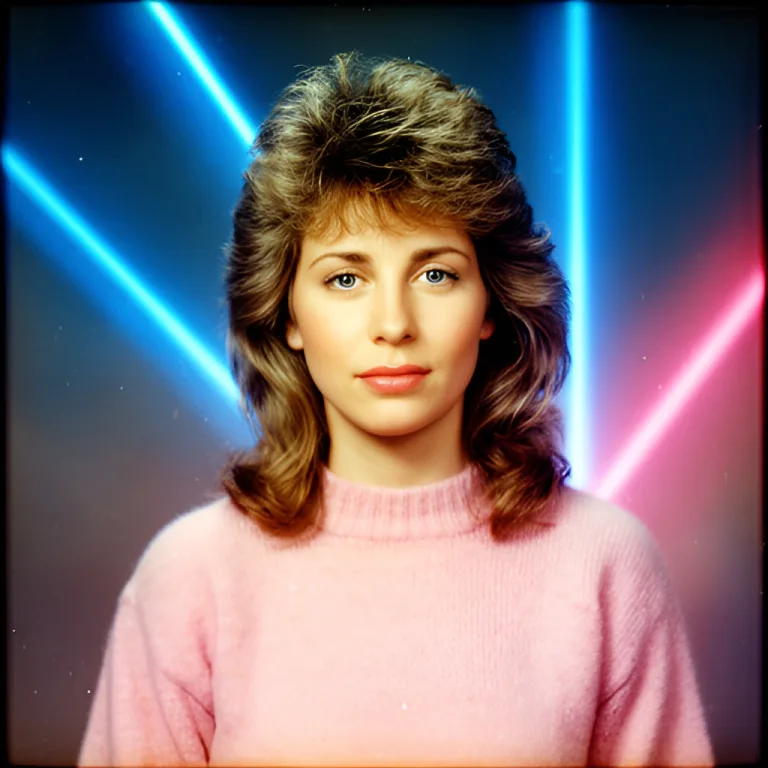
- Yearbook portrait — one selfie plus this brief, word for word, on all five tools: "1980s school yearbook studio portrait, big feathered voluminous 80s hair, pastel sweater, blue-and-pink laser beam backdrop, direct on-camera flash, soft focus, faded Kodak film colour, visible film grain"
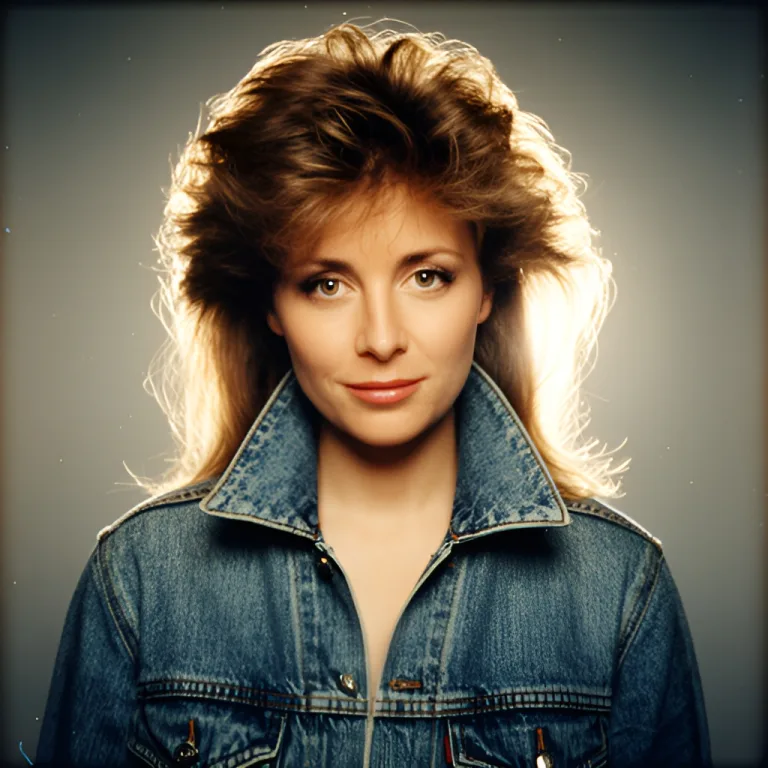
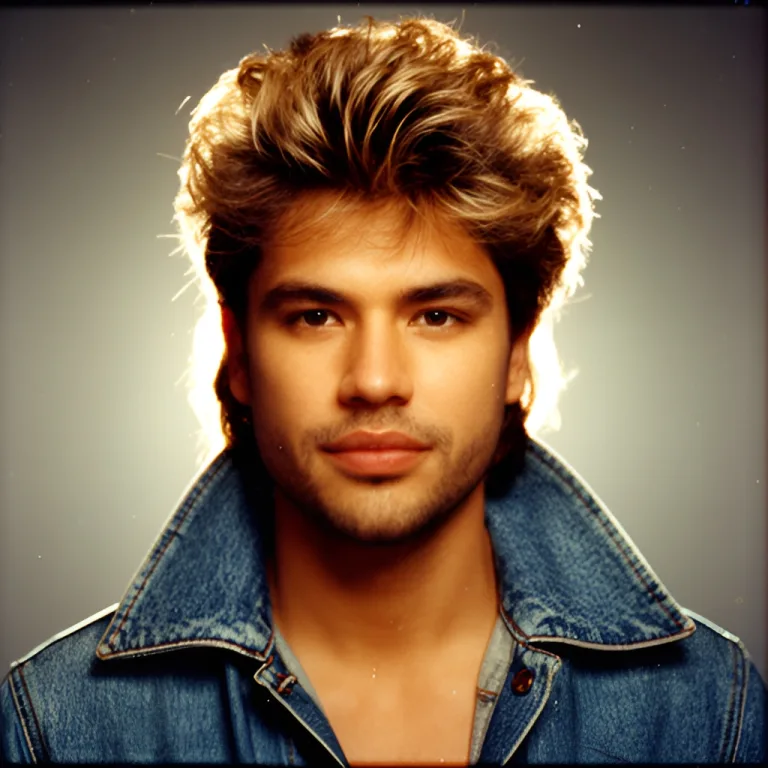
- Glamour studio portrait — teased hair, denim jacket, hair light from behind, soft-focus filter
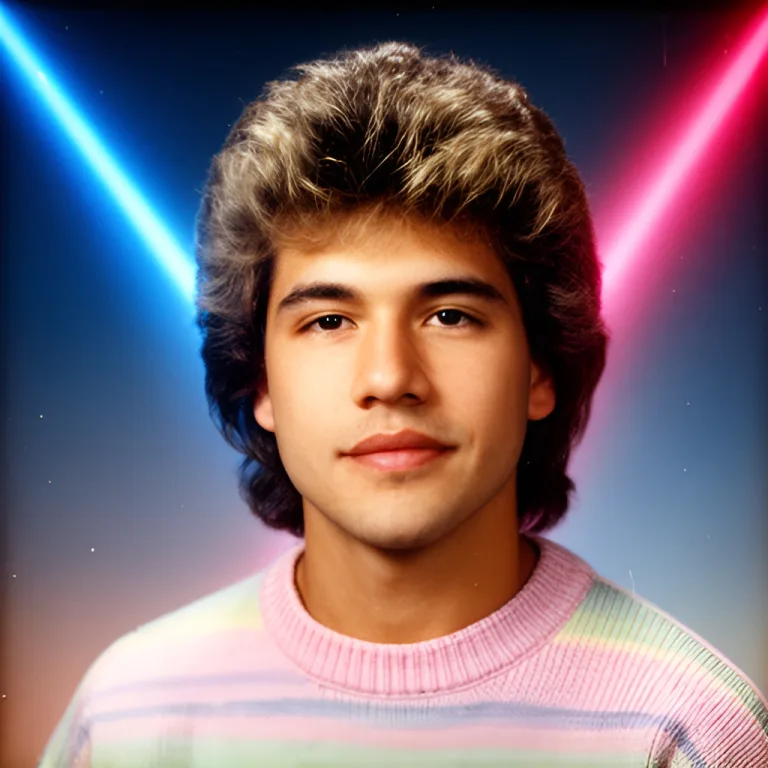
- Second face — a different test selfie on the same two briefs, to check the look holds across people
- Time to a finished portrait — from pressing generate to an image you can save
- What stands in the way — sign-in pages, daily limits, marks on the image
We scored each tool on:
Quick Comparison Table
| Feature | MiOffice AI | ChatGPT | Gemini | Fotor | Pixazo |
|---|---|---|---|---|---|
| 80s Look | 9.2/10 — period hair, wardrobe, backdrop and film colour every time | 9.0/10 — convincing | 9.0/10 — convincing | 7.5/10 — 80s styling on a different person | Not reached — sign-in first |
| Keeps Your Face | Yes — your selfie is the starting point | Yes — closest match in our run | Yes — close match | No — returned someone else in our run | Not reached — sign-in first |
| Time per Portrait | 17–18s | About a minute | About a minute | Over a minute | No result without an account |
| What You Hand Over | One selfie + one description | One selfie + a long prompt | One selfie + a long prompt | A prompt; our selfie did not register | Your sign-up details first |
| Output Size | 1024×1024 — fits feed and profile | Square, feed-ready | 1024×1024 | 880×1168 | Not reached |
| Marks on the Image | None | None in our run | Stray "YEARBOOK PORTRAIT" lettering in the corner | None in our run | Not reached |
| How Many Tries | No daily limit | Rationed on unpaid accounts — about 2–3 images a day reported | Daily cap on the basic tier | Each try spends credits | Starter credits after sign-up |
| Free Usage Limits | 20 welcome credits + Day Pass $2.49 | A few images a day, then wait | Daily image cap | Limited credits | 100 starter credits after sign-up |
| Apps Bundle | the full MiOffice catalog across 6 studios | Chat assistant — images are one feature | Chat assistant — images are one feature | Photo editing and design | AI image, video and audio generators |
| Pricing | Free / $2.49 Day Pass / $6.99 Starter | Free (limited) / $20/mo | Free (limited) / monthly plan | Free credits / paid plans | Starter credits / paid plans |
| Available On | Browser + 4 Extensions + Android + Windows | Web + phone and desktop apps | Web + phone apps | Web + phone and desktop apps | Web only |
| Works Inside AI Assistants | ChatGPT + Claude + Telegram | It is the assistant | It is the assistant | No | No |
| Privacy & Compliance | GDPR compliant | Photos go to its servers | Photos go to its servers | Photos go to its servers | Photos go to its servers |
| No Account Needed | Account unlocks the full MiOffice catalog | Account required | Google account required | Starts without one, credits run out | Sign-in page before the first image |
| Built By | Part of and built by JSVV SOLS LLC — Powering mission-critical systems for public and private sectors since 2021. | ||||
ChatGPT Tradeoffs
Why people still choose it:
- Close likeness — In our run the portrait kept the hair colour and face of the selfie more closely than any other tool.
- Conversational edits — Ask for a change and it revises the same picture.
Why people are switching away:
- About a minute per portrait: Three to four times slower than MiOffice AI on the same selfie and brief
- Rationed on unpaid accounts: Users report about 2–3 images a day before a wait of roughly 24 hours — one missed prompt can end the session
- Account required: You sign in before you can make anything
- The prompt is the work: The trend runs on long copy-paste prompts, and the result swings with the wording
- One job only: Need to cut out the background, enlarge the portrait or resize it for a Story? That is another tool
Detailed Reviews
1. MiOffice AI — One Selfie, One Description, a Finished 80s Portrait in Under 20 Seconds
How It Works
Upload one clear selfie to AI Headshot Generator, set Style to Creative and write the look you want in the Description box. Your selfie is the starting point for the portrait; the description supplies the decade. The portrait comes back square at 1024×1024, ready for a feed post or a profile picture.
In our runs all four portraits came back with period hair, wardrobe, backdrop and film colour, each in 17 to 18 seconds. The yearbook brief gave the most recognisably 1980s result; the glamour brief gave a mall-studio portrait with a soft hair light.
Technical Specs
- Input: One photo, one face — JPG, PNG or WebP up to 25 MB
- Controls: Style, Background and a free-text Description up to 800 characters
- Output: 1024×1024 portrait, no marks on the image
- Speed: 17–18 seconds per portrait in our runs
- Tries: No daily limit — generate again with a new description whenever you like
- Works on: Any browser on phone or desktop, nothing to install
The Bundle
The Headshot Generator is one of the full MiOffice catalog on MiOffice AI — an AI-powered digital workspace spanning AI, Video, Audio, Image, Document, Scanner, Notes, Screen Share, and File Transfer. Make the portrait, then remove the background, upscale the result, compress, or convert to WebP — or share it instantly via P2P file transfer, collaborate live on screen share, or drop feedback in Notes. All in the same browser tab. Start on desktop, hand off to mobile seamlessly with cross-device sync.
Pricing
Sign up for 20 welcome credits. $2.49 Day Pass for unlimited access to the full MiOffice catalog (excludes GPU-powered AI apps like AI Headshot Generator). $6.99 one-time credit pack. No subscriptions, no hidden limits.

- ✓ Convincing 1980s portrait in 4 of 4 runs — hair, wardrobe, backdrop and film colour
- ✓ 17–18 seconds per portrait — three to four times faster than ChatGPT and Gemini in our runs
- ✓ One selfie is enough — no set of photos to upload
- ✓ Your own description, not a fixed preset
- ✓ No daily limit on tries
- ✓ No marks on the image
- ✓ One account unlocks the full MiOffice catalog across multiple studios
- ✓ the full MiOffice catalog in one AI-powered digital workspace studio
- ✓ Available everywhere: browser, Chrome/Firefox/Edge/Safari extensions, Android, Windows, Telegram
- ✓ Inside AI assistants: ChatGPT GPT Store, Claude MCP Server, Claude.ai Connector
- ✓ Developer packages: npm, PyPI, crates.io, VS Code, GitHub Actions, n8n, Make, Zapier
- ✓ Compliance: GDPR compliant (details), HIPAA-safe by design, SOC 2 aligned, ISO 27001 aligned (Trust Center)
- ✓ Security: SSL Labs A+, TLS 1.3, HSTS Preload, COEP/COOP isolation, ImmuniWeb Grade A (Security)
2. ChatGPT — The Trend's Default Route (If You Have Images Left)
How It Works
ChatGPT is a chat assistant with image generation built in. Attach a selfie, paste a prompt describing the 1980s look, and it returns one portrait in the conversation. You can then ask for changes in plain language and it revises the picture.
Our Test Results
Likeness was the strongest point — the portrait kept the dark hair and the face of our test selfie more closely than any other tool, with feathered hair, a pastel sweater and a laser backdrop exactly as briefed.
The catch is the wait and the rationing. The portrait took about a minute, three to four times longer than MiOffice AI on the same selfie and brief. We ran it on a paid plan; on unpaid accounts image generation is limited and slower, and users report about 2–3 images a day before a wait of roughly 24 hours.
Technical Details
- Input: One photo plus a written prompt
- Speed: About a minute per portrait in our run
- Output: One square image per request
- Limits: Rationed on unpaid accounts; no published daily number
- Account: Required before anything is generated
- Privacy: Photos are uploaded to its servers
- ✓ Closest match to the selfie in our run
- ✓ Follows a detailed brief accurately
- ✓ Revises the same picture when you ask
- ✓ Handles group shots and full scenes
- ✗ About a minute per portrait — three to four times slower than MiOffice AI
- ✗ Images rationed on unpaid accounts — about 2–3 a day reported
- ✗ Account required before the first image
- ✗ $20 a month to lift the limits
- ✗ Results depend on long copy-paste prompts
- ✗ Images are one feature of a chat assistant — no editing workspace around them
3. Gemini — Convincing Portraits Behind a Daily Cap
How It Works
Gemini is Google's chat assistant. Attach a selfie from the upload menu, describe the 1980s look, and it returns one portrait in the conversation. Changes are requested in plain language.
Our Test Results
The portrait was convincing — big 80s hair, a striped pastel sweater and a laser backdrop, with a close match to the face in our test selfie.
It took about a minute, and the image came back with stray "YEARBOOK PORTRAIT" lettering printed in the corner that we never asked for. Our run was on the basic tier, which caps images per day, and the screen carried a notice that some of its models are moving to paid plans.
Technical Details
- Input: One photo plus a written prompt, attached through an upload menu
- Speed: About a minute per portrait in our run
- Output: 1024×1024
- Limits: Daily image cap on the basic tier
- Account: Google account required
- Privacy: Photos are uploaded to its servers
- ✓ Close match to the selfie
- ✓ Authentic period styling
- ✓ Revises the picture when you ask
- ✓ Works on the basic tier
- ✗ About a minute per portrait — three to four times slower than MiOffice AI
- ✗ Stray lettering stamped in the corner of the image in our run
- ✗ Daily cap on images
- ✗ Google account required before the first image
- ✗ On-screen notice that models are moving to paid plans
- ✗ Images are one feature of a chat assistant — no editing workspace around them
4. Fotor — An 80s Portrait — of Someone Else
How It Works
Fotor is a photo editing and design site with an AI image generator. Type a prompt, optionally add reference photos, and press Generate. It starts without an account, and each generation spends credits.
Our Test Results
Fotor produced an 80s-styled portrait, but not of our subject. In our run the reference slot stayed empty after we added the selfie, and the portrait that came back showed a different person entirely — the look of the decade without the one thing the trend is about.
It was also the slowest result in this group at over a minute, in a 3:4 shape (880×1168) that needs cropping for a square feed post.
Technical Details
- Input: A prompt; reference photos are optional and did not register in our run
- Speed: Over a minute in our run — slowest in this comparison
- Output: 880×1168 (3:4)
- Limits: Each generation spends credits
- Account: Starts without one
- Privacy: Photos are uploaded to its servers
- ✓ Starts without creating an account
- ✓ Convincing 1980s styling
- ✓ Part of a wider photo editing suite
- ✗ Returned a different person — our selfie did not register
- ✗ Slowest in this comparison at over a minute
- ✗ Every try spends credits
- ✗ 3:4 output needs cropping for a square post
- ✗ No way to keep trying freely until the look lands
- ✗ Cookie notice and sign-up prompts on the page
5. Pixazo — A Sign-In Page Before the First Image
How It Works
Pixazo is a set of AI generators for images, video and audio. Its image generator page lets you type a prompt and attach a photo to edit, then press Generate.
Our Test Results
We attached the selfie, pasted the brief and pressed Generate — and were sent to a sign-in page instead of a portrait. Nothing is generated until you create an account, so there was no result to score on likeness or speed.
The page advertises 100 starter credits and no marks on downloads, but you only reach them after signing up.
Technical Details
- Input: A prompt plus an attached photo
- Speed: No result without an account
- Output: Not reached in our run
- Limits: 100 starter credits after sign-up, then paid
- Account: Sign-in page before the first image
- Privacy: Photos are uploaded to its servers
- ✓ Accepts an attached photo with the prompt
- ✓ Starter credits after sign-up
- ✓ Several generators on one site
- ✗ Sign-in page before a single image is generated
- ✗ No portrait to judge without handing over your details
- ✗ Credits run out, then it is paid
- ✗ Web only — no phone apps or extensions
- ✗ No way to try the trend quickly
Make Your 80s Portrait Now
One selfie, one description, a finished portrait in under 20 seconds. the full MiOffice catalog in one workspace.
What's Coming Next
MiOffice AI is available on every major platform today — browser, Chrome/Firefox/Edge/Safari extensions, Android, Windows, ChatGPT GPT Store, Claude MCP Server, Telegram, npm/PyPI/crates.io, VS Code, GitHub Actions, n8n, Make, Zapier. Here's what's still in the pipeline:
- More decade looks in one tap — 70s, 90s and Y2K
- Portrait and Story-shaped output alongside square
- Batch portraits — several looks from one selfie in one go
- iOS & Mac native app (App Store — coming soon)
- WordPress plugin integration
Full platform availability: <a href="https://mioffice.ai/apps" style="color:var(--accent);">mioffice.ai/apps</a>
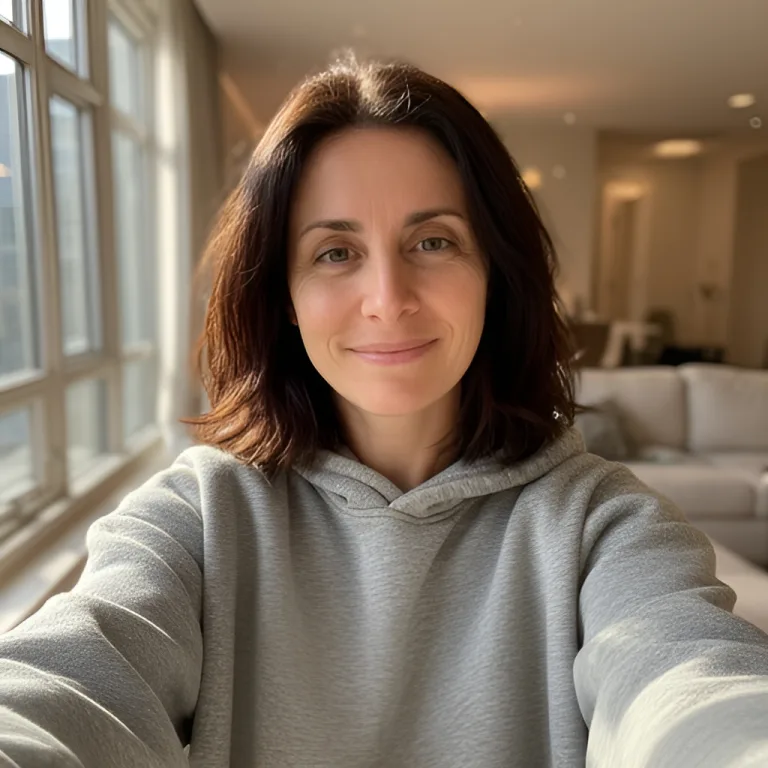
See Our Test Selfies and Portraits — Unedited
Both test selfies and all four MiOffice AI portraits are shown above exactly as they came out, resized only.
Test selfies are AI-generated faces, not real people.
80s Portraits with MiOffice — Fast, No Daily Limit
the full MiOffice catalog in one AI-powered digital workspace studio. One selfie is all it takes.
Open AI Headshot Generator →Which Should You Choose?
- For a postable 80s portrait in under 20 seconds: MiOffice AI — one selfie, one description, no daily limit, the full MiOffice catalog in one workspace
- For trying as many looks as you like: MiOffice AI — no daily cap on tries, so a missed look costs seconds, not the day
- For the closest possible likeness, if you can wait: ChatGPT — closest match to the selfie in our run, at about a minute per portrait and with images rationed on unpaid accounts
- For a matching set for couples and families: MiOffice AI — run each person with the same description so the backdrop and film look match
- For privacy-sensitive photos: MiOffice AI — GDPR compliant, private & secure
- For finishing the post (cut out, enlarge, resize, share): MiOffice AI — the full MiOffice catalog in one workspace — portrait, background, upscale, compress, share in one tab
- For people already paying for Google AI: Gemini — close likeness on the basic tier, with a daily cap and stray lettering to crop out
- For joining the trend on a budget: MiOffice AI — 20 welcome credits on signup + $2.49 Day Pass covers the rest of the workspace
Frequently Asked Questions
What is the best AI tool for the 80s photo trend in 2026?
What is the 80s AI photo trend?
What prompt makes the 80s look?
How long does an 80s AI portrait take?
Is ChatGPT free for the 80s photo trend?
Will the portrait look like me?
Can I make 80s photos of a couple or a family?
ChatGPT vs MiOffice AI for the 80s photo trend — which is better?
Do I need an account to make an 80s portrait?
Share this article
Jay Padimala
CEO & Founder, MiOffice
Jay Padimala is the founder of MiOffice AI and has 16 years of software engineering experience.
View all posts by Jay PadimalaRelated Guides
AI
AI Headshot Generator Guide
7 min read
AI
AI Cartoon Filter Guide
6 min read
AI
Best Free AI Face Swap Tools 2026
12 min read
all-in-one APPLICATIONS
AI Tools
Scanner Tools